
Changes you make in WordPress’s Site Editor are saved to the database, not to the theme’s files. They skip Git, and from then on they win over the files. That raised a question I had to answer: if I lock the editor to protect what’s tracked, why use WordPress at all?
In short:
- Site Editor changes to templates, headers and styles override the theme files, and later code changes stop showing.
- “Clear customisations” puts a template back to the file.
- I keep structure in code and content in the editor, and I’d set guardrails before handing a site to a client.
What the Site Editor changes
WordPress has two editors. The post editor is where you write posts and pages. The Site Editor is where you change the site itself: templates, the header and footer, colours and fonts.
The Site Editor is part of a bigger shift. WordPress started as a blogging tool, and it has been moving towards being a site builder, in the style of Wix and Squarespace, where you design the whole site by clicking instead of writing code. It’s useful, and it’s also why the problem below exists.
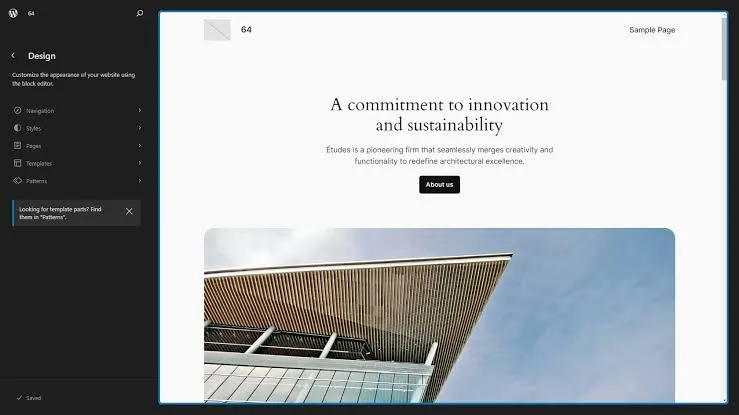
Part 2 explained that a WordPress site is code plus a database. The Site Editor blurs that line. My header is a file in the theme, tracked in Git. But if I open it in the Site Editor and change a link, WordPress saves a copy of the whole header in the database and shows that copy from then on.
Why that’s a problem
The next time I change the header in code and push it, nothing happens on the live site. The database copy still wins. There’s no error and no warning. The file in Git says one thing, and the site shows another.
The fix is in the Site Editor: open the template and choose “Clear customisations”. That deletes the database copy, and the file is back in charge. Any edits made in the editor are lost, so copy them into the code first.
Two smaller versions of the same problem tripped me up:
- Pages don’t travel. My About page layout is a template in code, but the page itself is content. I made it on my laptop, pushed the theme, and the live site still had no About page. I had to create the page there too.
- Menus are content. A menu saved in the menu screen lives in the database. I put my header links straight into the header file instead, so they deploy with the code.
So why use WordPress at all?
Because the editor isn’t the only thing WordPress gives me. It also gives me posts and pages, a media library, user accounts, plugins, and an API that other tools can talk to. Part 8 depends on that last one.
What I lock is structure, not content. The rule I follow:
- Code: templates, the header and footer, patterns, the design system. Anything that changes how the site looks.
- Database: posts, pages, images, settings. Anything that changes what the site says.
On my own site I go further than most would. The home page hero is in code too, so even its text is changed in code and not in the editor. I decided that on 9 October, because this site is mostly built with Claude, not edited by hand, and I want Git to be the only true version. If I ever want to edit the hero by hand, I can move it into a normal page.
Handing a site to a client
On a client site, the editor matters more, because the client is the one using it. This is how I’d set it up:
- Before handover: Git is the true version. Nobody edits templates in the Site Editor.
- At handover: the header, footer and templates stay in code. The body of each page becomes a normal page, built from patterns, which the client edits in the normal editor.
- Guardrails: turn off custom colours, font sizes and spacing in
theme.json, so the client picks from the brand’s settings and can’t type in random ones. Lock patterns so text and images can change but the layout can’t. - After handover: assume the database wins. A template change pushed later won’t show anywhere the client has customised that template.
None of this stops the client editing their content. It stops them breaking the design by accident, and it keeps the code worth maintaining.
Try this
If you have a block theme and suspect the live site doesn’t match your files, ask:
List any templates, template parts or global styles on this site that have been changed in the Site Editor and now override the theme files. Show me what differs. Don't change or clear anything.Next in the series: moving my old blog across, and how to get old posts into a new site, with or without SSH.