I write every post on this blog as a note in my vault, and one prompt puts it on the site. This post went up that way. I don’t open the WordPress dashboard at all.
In short:
- Posts are Markdown files in Obsidian, with the title, category and tags at the top.
- A skill converts the note to WordPress blocks and sends it to the site through the WordPress REST API.
- It logs in with an Application Password from my Mac’s Keychain, and only publishes when I say so.
Why write posts outside WordPress?
My notes are where I think. Every post in this series started as notes I wrote after each session. Copying a finished post into the WordPress editor, then fixing the formatting, uploading images and picking tags by hand, was the slow, boring part.
Writing in the vault also means the post is a plain text file. I can search it, back it up and edit it with Claude, like any other note.
What a post looks like in my vault
Each post is one Markdown file. The file name becomes the address: this one is publishing-a-post-with-one-prompt. At the top there’s a short block of settings:
- title and excerpt: what shows on the blog and in search results.
- category and tags: one category (Life or Code) and one to three tags.
- featured: the image file for the top of the post.
Images sit in a folder next to the posts, already converted to WebP and named after the post they belong to.
What happens when I say “publish this post”
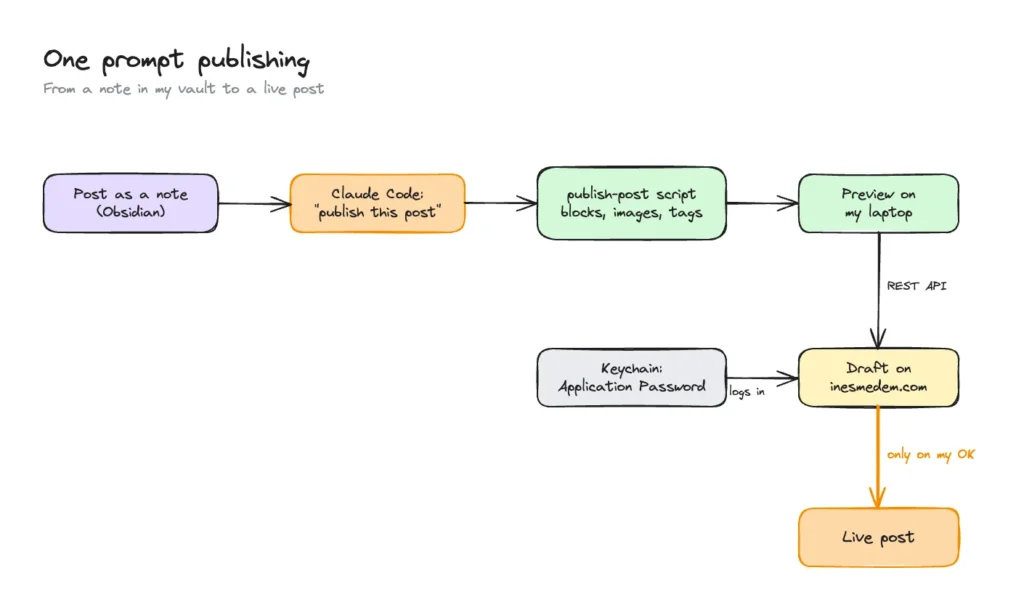
The publish-post skill runs a script that:
- converts the Markdown into WordPress blocks,
- uploads any new images, and skips ones that are already there,
- sets the category and tags,
- creates the post on my local copy first, so I can preview it,
- creates it on the live site as a draft,
- publishes it only when I say so.
Changing a post that’s already live needs its own instruction too. Claude asks before both.
How it logs in: Application Passwords
The script talks to WordPress through its REST API: a way for programs to read and change a WordPress site over the web, without the dashboard. WordPress has it built in. Nothing extra goes on the server, which matters on my plan with no SSH.
To log in, it uses an Application Password. That’s a second password for my account, made for a program instead of a person.
- It can’t log in to the dashboard. It only works for these requests from a program.
- My real password stays private. The script never sees it.
- One per tool. Each gets its own name, and I can revoke one without touching anything else.
- It can do what my account can. That’s why the script only makes drafts unless I say otherwise.
I made it in my WordPress profile and stored it in the macOS Keychain, the Mac’s built-in password store. The script reads it from there each time. It’s never in a file, in my notes or in a chat. I set this up on 5 November.
What I learned on the first real posts
- The Markdown file wins. If I fix a typo in the WordPress dashboard, the next run overwrites it. Edits go in the note.
- Featured images need to be bigger than I thought. A 1600px image looked soft on a high-resolution screen. I now export them at 2400 by 1350 pixels.
- One error, two causes. WordPress gives the same “not logged in” answer for a wrong password and for a host that strips the login from the request. The only real test was logging in with the right password. On Hostinger it worked first time.
Where the series ends up
This is the last part. Two months after Jorge’s call, my site goes live when I push, pages start as designs, the old posts are back, and new ones go up from my notes.
It isn’t finished. The deploy still runs from my laptop, and there are no automatic checks before a change goes live. Those are next.
The thing I’d pass on to anyone like Jorge: write things down as you go. My notes became this series, the rules file Claude follows, and the skills that do the repeat jobs. That’s what made it work.
Skills I used
These are the skills I used for this part. A skill is a set of written steps Claude follows when a job comes up.
publish-post: converts a note to WordPress blocks and publishes it through the REST API, as a draft first.web-image-prep: prepares the post’s images (WebP, named after the post) before they’re uploaded.
That’s the end of the series, which starts with how Jorge talked me into Claude Code. If you try any of this, I’d love to hear how it goes.